Tracking contracts
Track commercial contract renewals — leases, vendor agreements, insurance, SaaS — with renewal-window reminders so a notice deadline never slips past you.
A contract is a commercial agreement with a renewal you don't want to miss — a lease, a vendor agreement, an insurance policy, a SaaS contract. Spendrein tracks each one's expiration date and notice period, then reminds you before the window to cancel or renegotiate closes.
Contracts are different from subscriptions. A subscription is a recurring charge Spendrein finds on your bank or card statement and judges for waste. A contract is a commitment you record — there may be no monthly charge at all, just a date that matters and a notice period attached to it. The two live side by side: contracts feed the same committed monthly spend the dashboard reports, and a contract can be linked to the subscription it pays for so the amount isn't counted twice.
Contracts are an Operator and Business feature
Contract tracking is available on the Operator and Business plans. On the free plan the Contracts area shows an upgrade prompt instead of the list. Everything below assumes a plan that unlocks them.
What a contract holds
Each contract records the terms that drive its reminders:
| Field | What it's for |
|---|---|
| Counterparty | Who the agreement is with (the landlord, vendor, insurer). |
| Category | Lease, vendor, insurance, SaaS, and similar — used to group and filter. |
| Expiration date | When the current term ends. This anchors every reminder. |
| Notice period | How many days before expiration you must give notice to cancel. |
| Auto-renewal | Whether the contract rolls over automatically if you do nothing. |
| Monthly cost | The monthly-equivalent amount, if there is one — this is what feeds committed spend. |
| Linked subscription | An optional link to the matching subscription, so its cost isn't double-counted. |
Three ways to add a contract
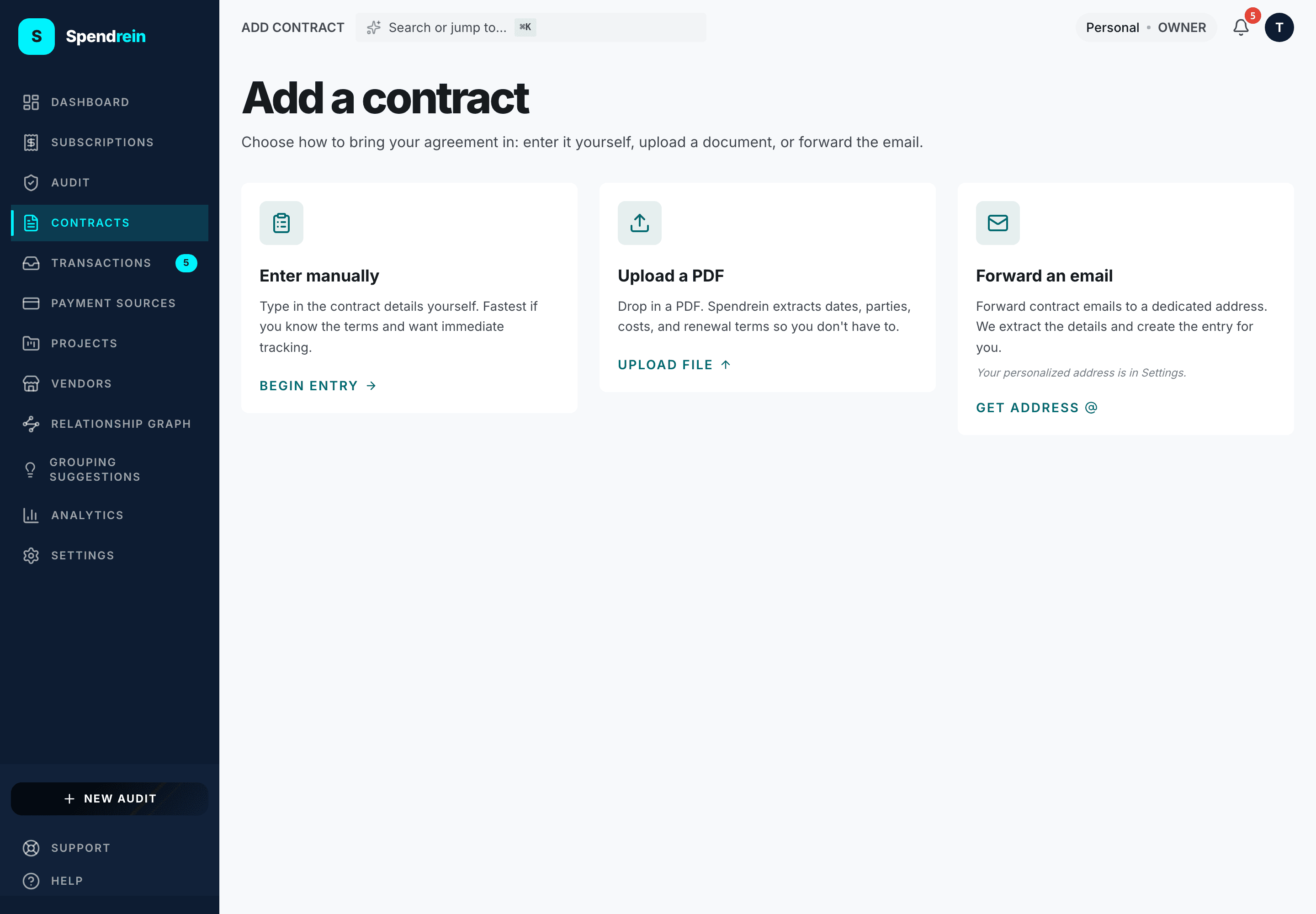
From Add a contract you pick how to bring the agreement in. All three end at the same tracked entry.
- Enter it manually. Type the details in yourself. Fastest when you already know the terms and want tracking to start immediately.
- Upload the PDF. Drop in a PDF and Spendrein extracts the dates, parties, costs, and renewal terms so you don't have to transcribe them.
- Forward the email. Forward the contract email to your personal Spendrein inbound address. We extract the details and create the entry for you.
Your personal inbound address is shown in Settings → Workspace → Contracts inbound email. It's unique to your workspace — forwarding to it routes the message straight into your contracts.
Extracted details are yours to confirm
When a contract comes from a PDF or a forwarded email, Spendrein fills in what it can read from the document. Open the entry and confirm the expiration date and notice period before you rely on the reminders — those two fields decide exactly when you get notified.
The notice window
The date Spendrein actually cares about isn't the expiration date — it's the notice deadline, which is the expiration date minus the notice period.
A lease that expires Dec 31 with a 60-day notice period has a notice deadline of Nov 1. Miss Nov 1 and you're committed to another term.
Every contract's detail view shows this deadline and how many days remain. If auto-renewal is on, the notice deadline is the last moment to step in before the contract rolls over on its own.
Renewal reminders
Spendrein sends a cascade of reminders ahead of the notice deadline — not the expiration date — so you have room to decide and act. Each contract triggers reminders at four points:
| Offset | When it fires |
|---|---|
| 30 days | A month before the notice window closes — time to gather quotes. |
| 14 days | Two weeks out — decision time. |
| 7 days | A week out — last comfortable window to give notice. |
| 1 day | The day before — final call. |
You can snooze individual offsets per contract without losing the others. Silencing the 30-day nudge on a contract you're still deciding about leaves the 14-, 7-, and 1-day reminders intact — each offset is independent.
If the deadline is already close
Add a contract whose notice deadline is sooner than 30 days out and only the offsets that haven't passed yet are scheduled. A contract added 10 days before its deadline still gets its 7-day and 1-day reminders; the earlier ones are simply skipped.
How contracts feed the dashboard
Contracts roll into the headline figures on your dashboard. Committed monthly spend is the monthly-normalized total of your active subscriptions plus your in-force contracts, in your display currency — a contract's monthly cost is part of that number, and the same figure drives the budget bar and the analytics page.
To keep the math honest, a contract linked to a subscription is deduped against it: the cost is counted once, not on both sides. Contracts you've marked cancelled or inactive drop out of the committed total — they're no longer a commitment.
Contract statuses
A contract moves through a small set of states. The status controls whether it counts toward committed spend and whether reminders keep firing.
| Status | Meaning |
|---|---|
| Active | In force and tracked. Counts toward committed spend; reminders fire. |
| Expiring soon | Inside its notice window — the deadline is near. |
| Needs review | An extraction landed but the key dates aren't confirmed yet. |
| Cancelled | You've ended it. Drops out of committed spend. |
| Inactive | A deliberate off-switch for a contract you no longer track. |
When a contract's renewal is something you want to actively cancel — and the agreement carries a vendor contact — that flows into the same cancellation tracking used for subscriptions.
Spendrein reminds — it doesn't act for you
Reminders tell you a notice deadline is approaching. Giving notice, renegotiating, or letting a contract lapse is still your call — Spendrein never cancels or renews a contract on its own.
Related
Transactions
The individual charges behind your subscriptions — how to review, link, dismiss, or promote them, and how the 30-day summary is calculated.
Vendors
The merchants you pay, as named entities — how vendors are created, categorized, and kept tidy across subscriptions, contracts, and transactions.