Cancellations
How Spendrein tracks a cancellation — the public reference, the contract email drafted for your own mail account, and the bank-feed watchdog. What we do, and what we don't.
When you decide to drop a subscription or end a contract, Spendrein turns that decision into a tracked record: a public reference, a first-class row in your workspace that you can always check on, and a bank-feed watchdog that flags it if the charges keep coming. Cancellations are tracked, not toggled — a status flip in some other tool isn't proof the money stopped.
Spendrein tracks cancellations — it does not cancel for you
Spendrein never logs into a vendor's site, never operates your account, and never speaks to a vendor as us. For contracts, it can draft a cancellation email — but that email goes out through your own email account, with your name on the From line, and any reply lands in your inbox. For subscriptions, "Mark as cancelled" sends nothing at all. In both cases the real cancellation is still yours to do; Spendrein's job is to record it and watch your bank feed until the charge actually stops.
What "tracking a cancellation" means
Every cancellation you start becomes a row Spendrein keeps and surfaces, with three things attached:
- A public reference like
CXL-a7f9c2— a short, stable token that identifies this one cancellation. It's stamped the moment you mark it. - A first-class record, not a checkbox — it carries the vendor, the date you requested it, and a status you can always read.
- A watchdog — Spendrein keeps watching your bank feed and flags any new charge from that vendor as an anomaly, so a "cancelled" subscription that quietly keeps billing doesn't slip past you.
Two flows, two behaviors
What happens when you hit cancel depends on what you're cancelling. The two flows are deliberately different, and the difference matters.
| Contract (with a vendor email on file) | Subscription | |
|---|---|---|
| What Spendrein does | Drafts a cancellation email | Records the cancellation |
| Is anything sent? | Yes — through your own email account | No — nothing is sent |
| Who is the sender? | You. Your From line, your mail account | N/A |
| Where do replies go? | Your inbox — Spendrein never sees them | N/A |
| Follow-up | Nudges you after 14 days if still open | Ongoing charge watchdog |
| Watchdog | Charge anomalies, as for any record | Charge anomalies |
Contracts: a draft sent from your own account
If a contract has a known supplier email, Spendrein can compose a cancellation email for you. It does not send that email as Spendrein. The message goes out through your own SMTP credentials (configured in Settings → Email), so:
- The From line shows you, not Spendrein.
- The Reply-To is intentionally left off. Any vendor reply therefore lands in your inbox — Spendrein does not receive it and does not read it.
- The subject carries a short reference token,
[CXL-{reference}], so you can recognize the thread later.
After the email goes out, the record moves to in progress. Spendrein then waits 14 days. If the record is still open at that point — because no reply has been logged — it flips to awaiting follow-up and notifies you:
It has been 14 days since the cancellation went out. Check your inbox — if the vendor replied, mark this resolved; otherwise re-send or mark failed.
You stay in control of the outcome: mark it resolved, re-send, or mark it failed. Spendrein never decides on its own that a vendor confirmed.
If you choose to forward a reply in
Because vendor replies go to your inbox, Spendrein doesn't see them by default. If you voluntarily forward a vendor's reply to your cancellation thread back to Spendrein, it can attach that text to the record. The reply is stored and shown as plain text only — never interpreted as HTML — and is byte-capped (2,048 bytes for the reply, 1,024 for a failure reason) so a long or malicious message can't break the page. This is opt-in; nothing routes back to us automatically.
Subscriptions: marked, then watched
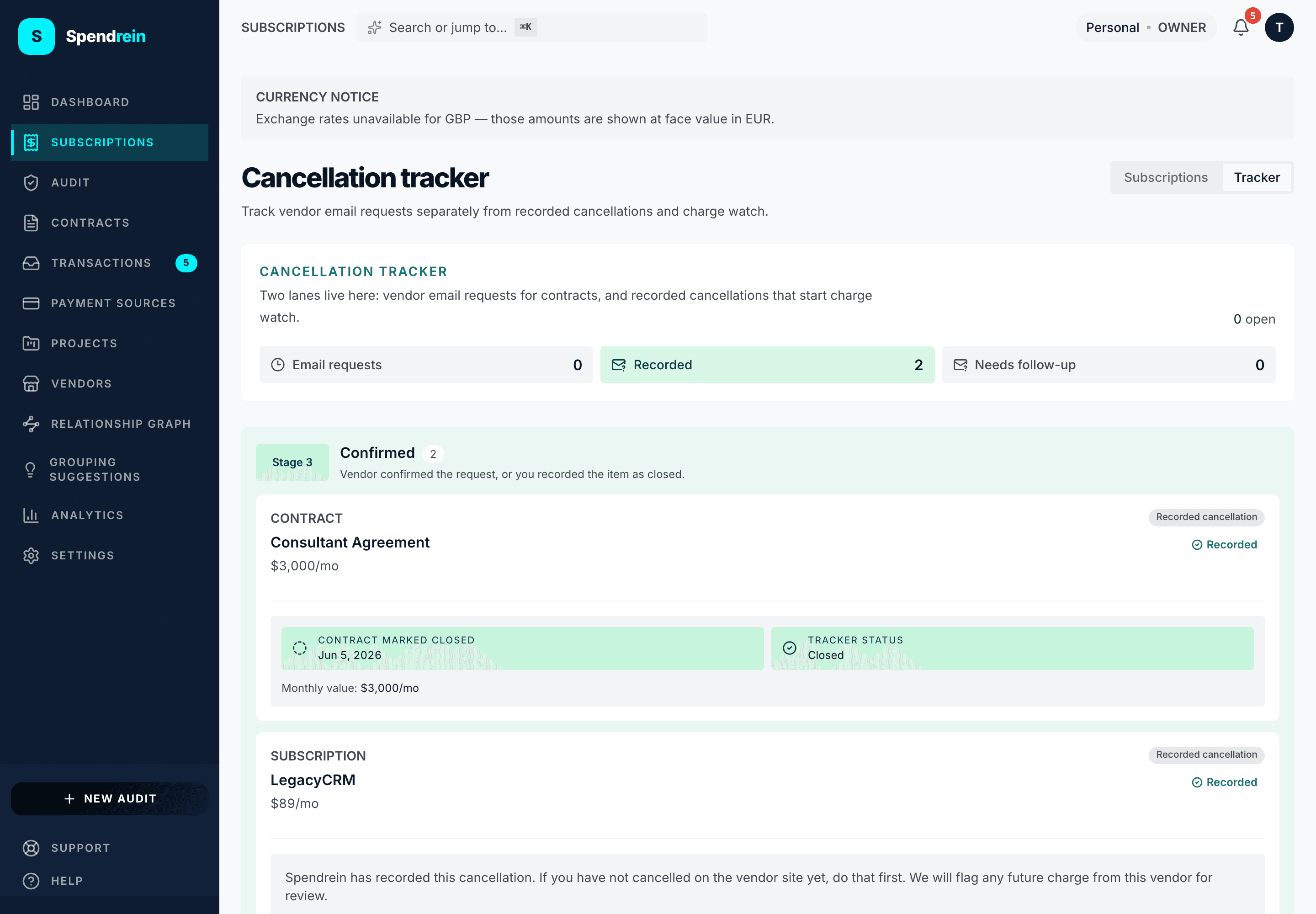
For a subscription, "Mark as cancelled" sends nothing. There is no email, no vendor contact, no automation reaching out on your behalf. Spendrein simply records that you've cancelled and switches the item to a watching state. The chip on the row reads:
Marked cancelled · watching for charges
with the honest framing spelled out underneath:
We have recorded your cancellation. Cancel on the vendor's site to stop future charges. We will flag any charge from this vendor as an anomaly.
That last line is the whole value: the charge-anomaly detector keeps an eye on your bank feed, and if the vendor bills you again after you marked it cancelled, that charge surfaces as an anomaly instead of disappearing into the total. The vendor cancel itself is still something you do on their site — Spendrein watches to confirm it actually took.
The public reference
Every cancellation, contract or subscription, gets a CXL- reference the
instant you mark it. It's how a cancellation stays addressable:
| Where it shows up | What it's for |
|---|---|
| The cancellations panel | The label on each tracked cancellation |
| A contract email subject | The [CXL-{reference}] token on the drafted message |
| A forwarded vendor reply | How a reply you forward in is matched to the record |
You don't have to memorize it — Spendrein keeps the reference attached to the record — but it's the load-bearing thread that ties an email, a reply, and a status together.
The watchdog
A status that says "cancelled" is a claim, not proof. The watchdog is what turns the claim into evidence: Spendrein keeps watching your bank feed for charges from that vendor, and any charge that arrives after you marked the cancellation is raised as a charge anomaly — the same detector that flags unexpected or duplicate charges anywhere in your spend. A clean feed, charge after charge with nothing from that vendor, is your confirmation the cancellation landed.
Where to find it
All of your tracked cancellations live in the cancellations panel on the
subscriptions page, at /subscriptions?panel=cancellations. Each entry
shows its reference, vendor, status, and — for contract cancellations that
received a forwarded reply — the vendor's reply text. A contract or subscription
with an open cancellation also shows an inline banner on its own detail page,
with the right framing for its flow (drafted-email for contracts, watchdog for
subscriptions).
Related
Relationship graph
An interactive canvas of how your subscriptions, contracts, transactions, vendors, payment sources, and projects connect — and how to read, build, and confirm those links.
Workspaces & roles
Personal vs team workspaces, the four roles, seats and invitations, transferring ownership, and what happens to a team workspace when billing fails.